Kneeboards for C-130J-30 Hercules for startup procedures and weapon employment.
These are not official procedures, just what I've put together as a quick reminder on how to perform a cold start and employ weapons (i.e. MOAB) on the C-130J-30 Hercules.
Kneeboards include:
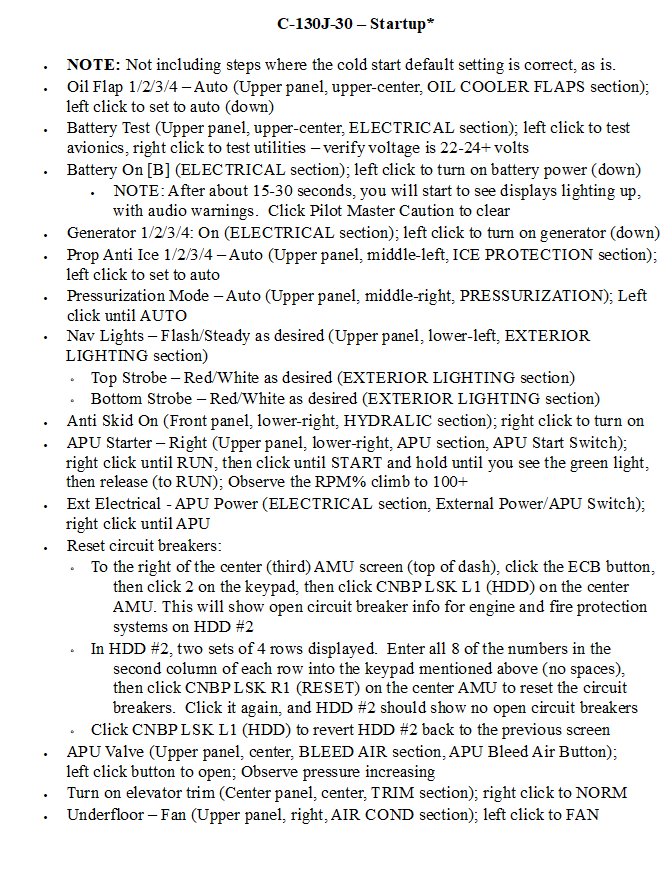
C-130J-30 - STARTUP-1.png
C-130J-30 - STARTUP-2.png
C-130J-30 - STARTUP-3.png
C-130J-30 - USING GBU-43 MOAB-1.png
C-130J-30 - USING GBU-43 MOAB-2.png
NOTE:
The C-130J-30 Hercules kneeboards need to be placed in the C-130J-30 Kneeboard folder, for example:
C:\Users\<your name>\Saved Games\DCS.openbeta\Kneeboard\C-130J-30
Enjoy!
AKA_Relent
(ED forums: 609_Relentov)
============================================
Update: 12/7/2025: Made minor corrections to two of the startup kneeboards, and added some additional information and clarification details to both MOAB kneeboards:
C-130J-30 - STARTUP-2.png
C-130J-30 - STARTUP-3.png
I was incorrectly spelling tool tip names of the visible AMU #1/#2 buttons with MNU instead of AMU, so this was fixed; Please replace the original startup kneeboards above with these corrected ones
C-130J-30 - USING GBU-43 MOAB-1.png
C-130J-30 - USING GBU-43 MOAB-2.png
I've added information about the ramp WoW override, the use/non-use of the chute for the GBU-43 MOAB, and some additional employment-related suggestions; Please replace the original kneeboards above with these new ones
============================================
Update: 12/3/2025: Made a minor correction to one kneeboard:
C-130J-30 - STARTUP-1.png
There was a minor correction to the following step at the bottom of the page:
Turn on elevator trim (Center panel, center, TRIM section); left click to NORM
It should have read:
Turn on elevator trim (Center panel, center, TRIM section); right click to NORM
Please replace the original kneeboard with this corrected one.
============================================
Update: 12/2/2025: Added startup kneeboards:
C-130J-30 - STARTUP-1.png
C-130J-30 - STARTUP-2.png
C-130J-30 - STARTUP-3.png
These are abbreviated startup procedures as I have not included steps where the cold start default settings are correct, as is.
Credit to ralfidude and Itty for providing some great reference material in their respective DCS C-130J startup videos:
ralfidude: https://youtu.be/aSbjY2n99-M
Itty: https://youtu.be/6FTDYKOXQco
============================================
Update: 12/1/2025: Updated the GBU-43 MOAB kneeboard, which has expanded it from one to two pages:
C-130J-30 - USING GBU-43 MOAB-1.png
C-130J-30 - USING GBU-43 MOAB-2.png
Please delete the following kneeboard and replace it with the two above:
C-130J-30 - USING GBU-43 MOAB.png
Based on a thread in the ED forum, it was found that we can enter the target coordinates for the GBU-43 MOAB. A section was added to the kneeboards to enter these coordinates.