Here is my Mi-8MTV2 layout for the Warthog HOTAS using Polaris & Schnix custom profiles as a base layout with some additional info on the Mi-8MTV2.
Place the .dff files anywhere you want, ex: your Mi-8 input file, and load the input under the correct controller in the controller setup in the game settings. In addition, You will need to add a "Modifier" for the Joystick lever (button 4) button under controller setup. The modifier add should be on the bottom left side of the controller setup. Just rename "button 4" to "Lever" and add. Now when you hold the lever, it should access the second function you programmed in.
I've also added a PDF with weapon/countermeasures/jettison implementation procedures and info. The information are highlights from Chuck's MI-8MTV2 Guide. I hope you find this setup and information useful.
License: Freeware - Free version, Unlimited distribution
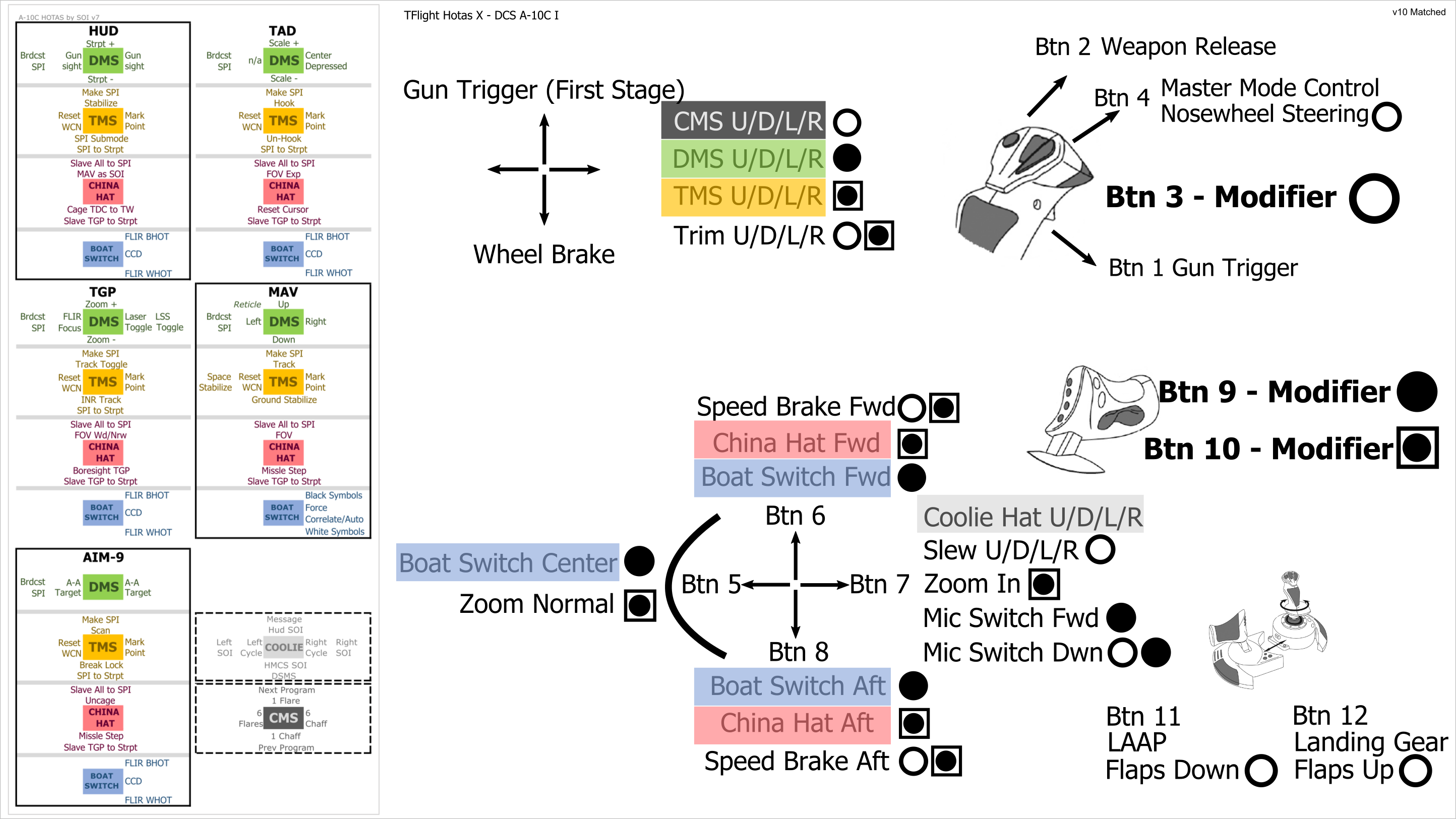
Control profile for the Thrustmaster Tflight HOTAS X joystick in DCS A-10C with attached diagrams for easy reference, including bonus HOTAS by SOI references.
Looking for A-10C II? Get them here: https://www.digitalcombatsimulator.com/en/files/3312549/
NOTE: Since there is no notification system for new comments, I may not see your comment in a timely manner. If you have have a question or suggestion that needs quick attention, please message me on the forums, my name there is Raven257.
### 20201124 ###
Correction 10b
* Combo - Sorry guys and gals, I tried the earlier release and I'm gonna have
to be a little selfish on this one. Updated the sizing ratio to correspond to
16:9, I can't stand having the black borders while I'm using them. Badging
kept as 10, affected files updated to 10b.
### 20201124 ###
Release version 10
All - Add CMS controls, adjust layout here and there.
Update HOTAS by SOI to latest v7
License: Freeware - Free version, Unlimited distribution
We use cookies to provide you with a better onsite experience. By continuing to browse the site you are agreeing to our use of cookies in accordance with our Cookie Policy.
Found a typo? Select it with your mouse and press Ctrl+Enter.










![Austrian Airforce [Fictional AB212 copy]](/upload/iblock/70c/Titelbild2.jpg "Austrian Airforce [Fictional AB212 copy]")