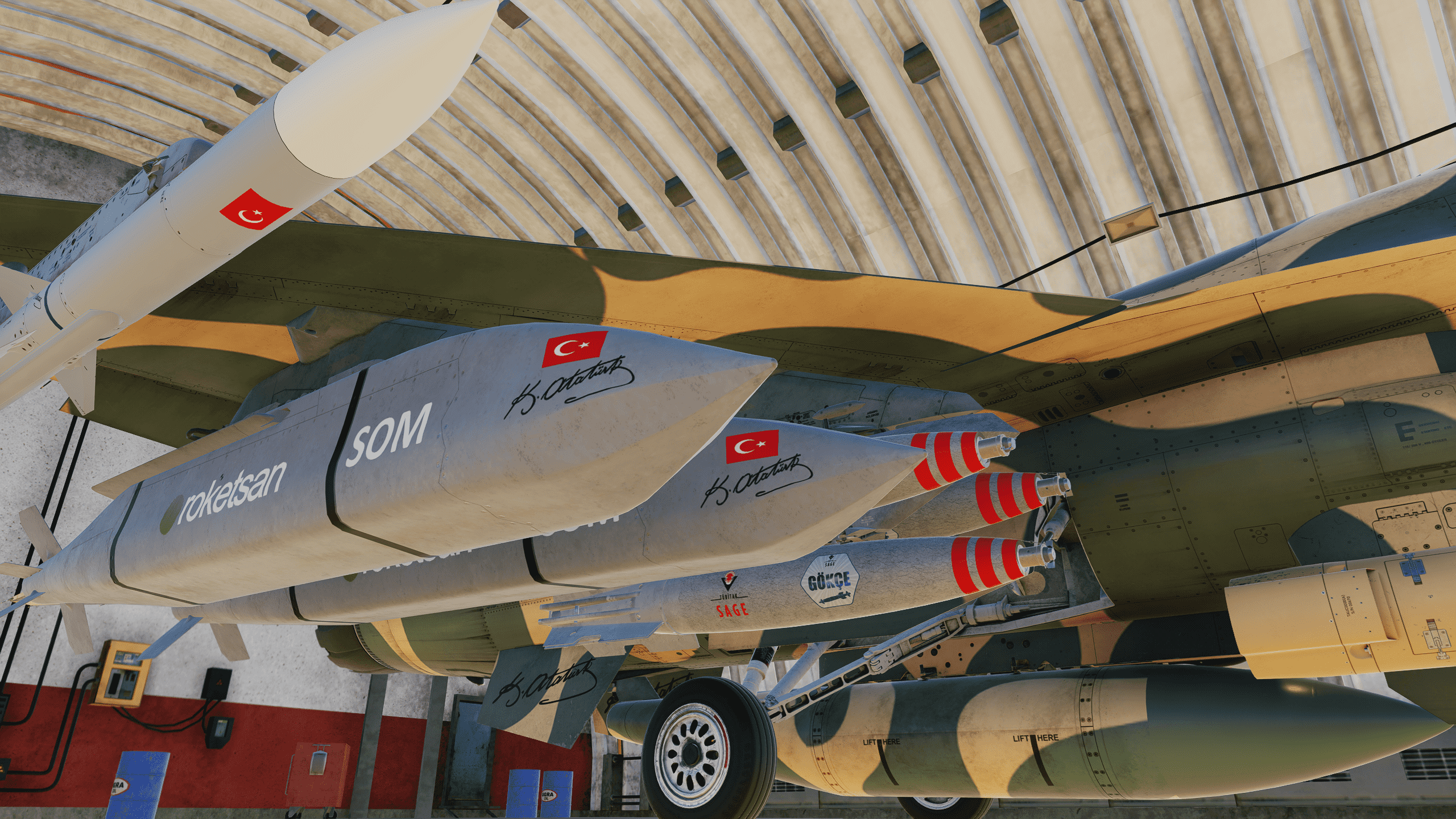
Mühimmat Envanteri Güncellendi.
İndirmek için Linke Tıklayınız.
------------------------------------
https://disk.yandex.com.tr/d/ySvriY8eyhB0Jw
------------------------------------
Kurulum
F-16C kaplamasının aşağıdaki dizine yerleştirilmesi gerekmektedir: C:\Users\<Kullanıcı Adı>\Saved Games\DCS\Liveries\F-16C_50 F-16C_50 klasörü yoksa manuel olarak oluşturabilirsiniz.
Krediler kubilay1903 : Füze (missile) kaplamaları kullanılmıştır, teşekkür ederim.
Vizör camı (visor glass) rengi BogeyDope tarafından yapılmıştır.
Livery Dosyaları : Texac tarafından hazırlanan livery dosyaları örnek alınarak yapılmıştır.
-Ammunition Inventory Updated.
-Click the link below to download.
https://disk.yandex.com.tr/d/ySvriY8eyhB0Jw
This livery is a custom F-16C Block 50 skin created for the Turkish Air Force, representing a fictional scenario of the 101st Squadron “Hunters” (101. Hunter Sqn).
Credits
kubilay1903
Boge
Bu çalışma, Türk Hava Kuvvetleri için kurgulanmış 101. Filo “Avcılar” konseptine ait özel bir F-16C Block 50 kaplamasıdır.
“Çöl Tilkisi” teması; gizlilik, çeviklik ve avcı ruhunu yansıtan çöl kamuflajı detaylarıyla tasarlanmıştır. Kaplama, DCS World içinde hem operasyonel hem de sinematik görevler için uygun olacak şekilde hazırlanmıştır.
Kurulum
F-16C kaplamasının aşağıdaki dizine yerleştirilmesi gerekmektedir: C:\Users\<Kullanıcı Adı>\Saved Games\DCS\Liveries\F-16C_50 F-16C_50 klasörü yoksa manuel olarak oluşturabilirsiniz.
Krediler kubilay1903 : Füze (missile) kaplamaları kullanılmıştır, teşekkür ederim.
Vizör camı (visor glass) rengi BogeyDope tarafından yapılmıştır.
Livery Dosyaları : Texac tarafından hazırlanan livery dosyaları örnek alınarak yapılmıştır.
This livery is a custom F-16C Block 50 skin created for the Turkish Air Force, representing a fictional scenario of the 101st Squadron “Hunters” (101. Hunter Sqn).
NOT:
- Pilot Kaskı gözükmez ise; "Pilot_F16_Helmet_Visor_Glass MİSSİNG hatası" alırsanız, bu yönergeyi yapınız.
C:\Users\"SİZİN KULLANICI ADINIZ"\Saved Games\DCS\Liveries\F-16C_50\default klasörü içindeki description.lua 'ya
--Visor Color--
{"pilot_F16_visor_glass", DIFFUSE , "pilot_f16_helmet_visor_glass", false};
{"pilot_F16_visor_glass", NORMAL_MAP , "pilot_f16_helmet_visor_glass_normal", true};
{"pilot_F16_visor_glass", SPECULAR , "pilot_f16_helmet_visor_glass_roughmet", true};
BU KODU EKLEYİNİZ.
- EĞER KLASÖR ve description.lua YOK İSE; kendiniz default klasörü ve içerisine description.lua oluşturunuz.
- description.lua' ya yukarıda verilen kodu yazınız.
- default klasörü içerisine indirmiş olduğunuz THK_101_Cöl_Tilkisi klasörü içerisinde bulunan; "Pilot_F16_Helmet_Visor_Glass.dds" kaplamasını default klasörü içerisine atınız. Pilot Kaskının kaplaması gözükecektir.
Installation
- Ammunition Inventory Updated.
- Click the link below to download.
https://disk.yandex.com.tr/d/ySvriY8eyhB0Jw
NOTE:
If the pilot helmet visor is not visible and you receive the error
“Pilot_F16_Helmet_Visor_Glass MISSING”, follow the instructions below.
Go to:
C:\Users\"YOUR USER NAME"\Saved Games\DCS\Liveries\F-16C_50\default
and open (or create) the file description.lua.
Add the following code to description.lua:
-- Visor Color --
{"pilot_F16_visor_glass", DIFFUSE, "pilot_f16_helmet_visor_glass", false};
{"pilot_F16_visor_glass", NORMAL_MAP, "pilot_f16_helmet_visor_glass_normal", true};
{"pilot_F16_visor_glass", SPECULAR, "pilot_f16_helmet_visor_glass_roughmet", true};
If the default folder and description.lua file do not exist:
Manually create the default folder
Create a new file named description.lua inside it
Paste the code above into the file
Copy the texture file Pilot_F16_Helmet_Visor_Glass.dds from the
THK_101_Cöl_Tilkisi livery folder you downloaded
into the default folder.
The F-16C livery must be placed in the following directory:
C:\Users\<User Name>\Saved Games\DCS\Liveries\F-16C_50
If the F-16C_50 folder does not exist, you can create it manually.
Credits
kubilay1903 – Missile liveries used. Many thanks.
BogeyDope – Visor glass color.
Texac – Livery files used as reference.