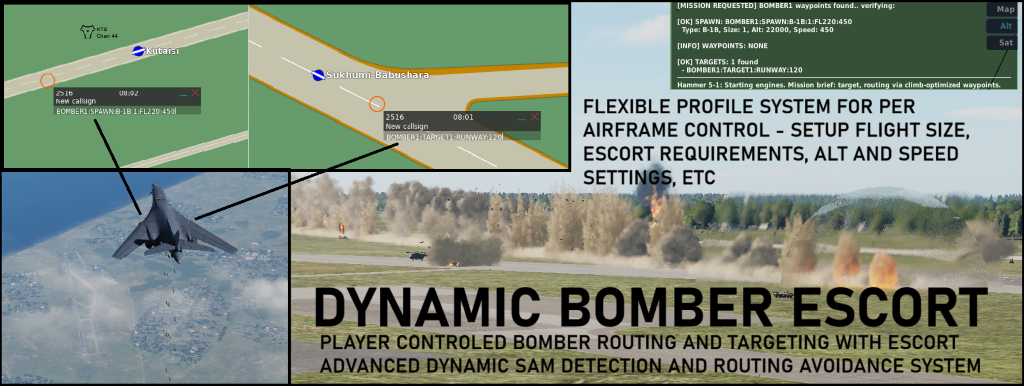
MOOSE Bomber Escort System
A comprehensive, dynamic AI bomber mission system for DCS World using the MOOSE framework. This script allows players to create, launch, and escort AI bomber missions with advanced threat detection, SAM avoidance, and intelligent bomber/escort interaction—all controlled via F10 map markers and menus.
Updated versions can always be found on github:
https://github.com/iTracerFacer/Moose_BomberEscort
Features
Player-Driven Bomber Missions:
Create bomber missions by placing F10 map markers (no scripting required).
Supports multiple bomber types (WWII, Cold War, Modern, Soviet).
Customizable flight size, altitude, speed, and route.
Escort System:
Bombers require player escort to proceed (configurable per bomber type).
Real-time escort detection (distance, heading, altitude, speed, and formation).
Dynamic in-game feedback and voice lines for escort actions.
Compliments for tight formation flying.
Threat Detection & Avoidance:
Real-time detection of SAMs and enemy fighters.
Pre-mission route analysis for SAM threats; auto-reroutes through safe corridors if possible.
In-flight dynamic threat monitoring and mission abort if threats become critical.
Configurable threat tolerance and abort logic.
Mission Types & Targeting:
Supports runway carpet bombing, area carpet bombing, point targets (buildings, bridges), and multi-target missions.
Auto-detects runways and attack headings.
Customizable ingress, egress, and RTB waypoints.
F10 Menu Integration:
Launch, respawn, and monitor missions via F10 menu.
Player guide and mission status available in-game.
Logging & Debugging:
-- QUICK START GUIDE
-- =================
--
-- 1. MISSION EDITOR SETUP:
-- - Add late-activated groups for desired bomber types
-- - Name templates exactly as shown in the naming convention below
-- - Load MOOSE framework and this script in your mission
--
-- 2. CREATE MISSIONS USING F10 MAP MARKERS:
-- - Place markers on the F10 map with specific text formats
-- - Use the TAG system (marker-based mission creation) as detailed below
--
-- 3. LAUNCH MISSIONS:
-- - Use F10 menu: "Bomber Missions > Launch Bomber Mission"
--
-- 4. ESCORT THE BOMBERS:
-- - Fly within escort detection range and maintain formation
-- - Respond to in-game warnings and voice feedback
--
-- USING THE TAG SYSTEM (F10 MAP MARKERS)
-- ======================================
--
-- The TAG system allows players to create complete bomber missions by placing F10 map markers
-- with specific text formats. Each mission is identified by a unique MISSIONID (e.g., BOMBER1, STRIKE2).
--
-- BASIC MARKER SYNTAX:
-- -------------------
-- MISSIONID:KEYWORD[:PARAMETERS]
--
-- REQUIRED MARKERS:
-- ----------------
-- * SPAWN Marker: Defines the bomber type, size, altitude, and speed
-- Format: MISSIONID:SPAWN:BOMBERTYPE[:SIZE][:ALTITUDE][:SPEED][:FLAGS]
-- Examples:
-- BOMBER1:SPAWN:B-52H (default size/alt/speed)
-- BOMBER1:SPAWN:B-1B:4:FL250:500 (4-ship, 25,000ft, 500kts)
-- BOMBER1:START:B-17G:2:FL200:180 (alternative START keyword)
--
-- * TARGET Marker: Defines the primary mission target
-- Format: MISSIONID:TARGET#:TARGETTYPE[:ATTACKTYPE][:HEADING][:ALTITUDE]
-- Examples:
-- BOMBER1:TARGET1 (basic point target)
-- BOMBER1:TARGET1:RUNWAY:090 (runway attack from 090° heading)
-- BOMBER1:TARGET1:CARPET:270 (carpet bombing from 270°)
-- BOMBER1:TARGET1:FACTORY:CARPET:FL150 (factory carpet at FL150)
--
-- OPTIONAL MARKERS:
-- ----------------
-- * WAYPOINT Markers: Define en-route waypoints for ingress/egress
-- Format: MISSIONID:WP#:COORDINATES
-- Examples:
-- BOMBER1:WP1 (waypoint 1)
-- BOMBER1:WP2 (waypoint 2)
--
-- * RTB Marker: Defines custom Return-To-Base point
-- Format: MISSIONID:RTB
-- Example: BOMBER1:RTB
--
-- * RESET Marker: Aborts and removes a mission
-- Format: MISSIONID:RESET
-- Example: BOMBER1:RESET
--
-- ADVANCED PARAMETERS:
-- ------------------
-- * Bomber Types: B-1B, B-17G, B-24J, B-52H, Tu-95, Tu-142, Tu-22M3, Tu-160
-- * Altitude: FL100-FL600 or numeric feet (e.g., 25000)
-- * Speed: Knots (e.g., 450)
-- * Size: 1-4 aircraft per flight
-- * Attack Types: RUNWAY, CARPET, AUTO
-- * Target Types: FACTORY, BUNKER, FUELTANK, etc. (cosmetic)
-- * Flags: :FORCE (override airbase spawn), :SCRAMBLE (immediate launch)
--
-- MISSION EXECUTION:
-- -----------------
-- 1. Place all required markers (SPAWN + at least one TARGET)
-- 2. Use F10 menu to launch the mission
-- 3. System validates markers and provides feedback for errors
-- 4. Bombers spawn and wait for escort if required
-- 5. Escort players fly within detection range to proceed
-- 6. Mission executes with threat monitoring and voice updates
--
-- ERROR HANDLING:
-- --------------
-- The system provides detailed feedback for malformed markers:
-- - Missing bomber type: Shows correct SPAWN format
-- - Invalid bomber type: Lists all available types
-- - Incomplete missions: Indicates missing required markers
-- - Malformed syntax: Provides examples and corrections
Highly recommend firing up the included example mission so you can watch how the system behaves in real time (Use Ctrl-Z and Shift-Z to speed up and reset the speed)
Thank you for taking the time to read through my scripts and give them a try! All of my scripts are in constant development, so please check regularly on GitHub at https://github.com/iTracerFacer for the latest versions and updates. Your feedback is greatly appreciated!