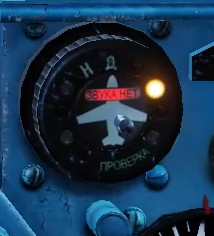
Fixed a bug with the lack of indication on RWR, which appeared with the latest update
Исправлен баг с отсутствием индикации на СПО, который появился с последним обновленеим
Simply put the "Cockpit_MiG-21bis" folder in the following directory:
Saved Games\DCS\Liveries\Cockpit_MiG-21bis
If you want to fix the English or Chinese cockpit, you need to:
1. Find the "MiG21Bis_CP_020.tga" file, which was before the update 2.9.12.5336
2. Create a folder "English - Metric_fixed_rwr" (or Chinese_fixed_rwr) next to the default folder.
"Saved Games\DCS\Liveries\Cockpit_MiG-21bis\English - Metric_fixed_rwr"
3. Copy the contents of the livery from the root folder of the game (DCS World\Mods\aircraft\MIG-21bis\Liveries\Cockpit_MiG-21bis\English - Metric) there, replacing the "MiG21Bis_CP_020.tga" file
4. Select this cockpit (English - Metric_fixed_rwr) in the module settings
Perhaps there is an easier and more convenient way, but I don't know how
Это фикс только для дефолтного кокпита
Если вы хотите исправить английский или китайский кокпит, то вам нужно:
1. Найти файл "MiG21Bis_CP_020.tga", который был до обновление 2.9.12.5336
2. Создать папку "English - Metric_fixed_rwr" (или Chinese_fixed_rwr) рядом с папкой default.
"Saved Games\DCS\Liveries\Cockpit_MiG-21bis\English - Metric_fixed_rwr"
3. Скопировать туда содержимое ливери из корневой папки игры (DCS World\Mods\aircraft\MIG-21bis\Liveries\Cockpit_MiG-21bis\English - Metric), заменив файл "MiG21Bis_CP_020.tga"
4. Выбрать этот кокпит (English - Metric_fixed_rwr) в настройках модуля
Возможно, есть способ проще и удобнее, но я не шарю в моддинге ДКСа